YouTube on-screen speed controller
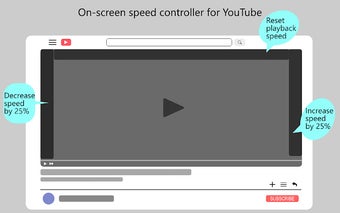
YouTube on-screen speed controller is a Chrome add-on that provides users with the ability to control the playback speed of YouTube videos directly on the screen. With this tool, users can easily adjust the speed of the video by simply clicking on the corners of the video player. This add-on also offers the convenient feature of ad fast-forwarding, allowing users to skip through advertisements quickly.
The installation process is straightforward. After installing the add-on, users need to reload the YouTube page to enable the speed control functionality. Once the page is reloaded, users can start adjusting the playback speed of YouTube videos by clicking on the corners of the video player. This on-screen speed controller provides a simple and intuitive way to customize the speed of YouTube videos, enhancing the viewing experience.
Overall, YouTube on-screen speed controller is a useful tool for those who want more control over the playback speed of YouTube videos. Its ad fast-forwarding capabilities add further convenience to the browsing experience. With its easy installation process and intuitive interface, this Chrome add-on is a valuable addition for users looking to optimize their YouTube viewing experience.